Bookkeeping that shows what you kept.
Record a sale and BuckLoad takes out the sales tax, the card fee and what the item cost you, right then. Invoices, expenses, receipts, mileage and tax deadlines live in the same place, on your phone or your computer.
The demo is a made-up bakery with two months of sales. Click anything; nothing is saved.
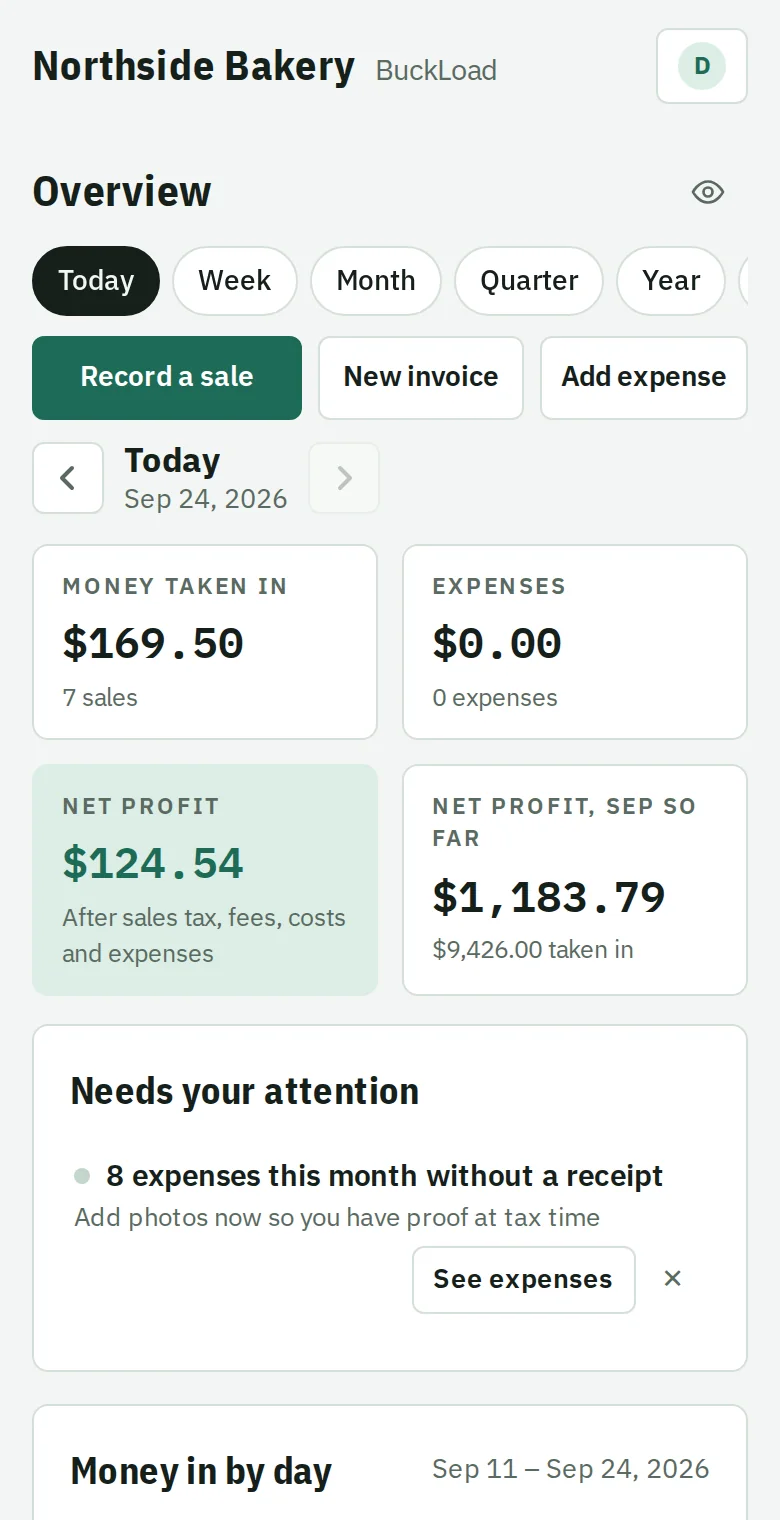
Ring up a sale, see the profit
Set each product's price and what it costs you once. After that a sale takes a couple of taps, and your profit for today and this month is always on screen.
- Paid two ways
- Part cash, part card? Split the payment, and the card fee is worked out only on the card part.
- Your fees, your tax rate
- Square, Stripe, Zelle, checks or anything else, each with its own fee. Connect Square and its sales come in by themselves. Prices can include sales tax or have it added.
- Discounts and refunds
- Take dollars or a percent off before tax. Refund a sale and the profit, tax and stock count follow.
- Stock, if you want it
- Turn on stock counts in Settings and get a warning when a product runs low.
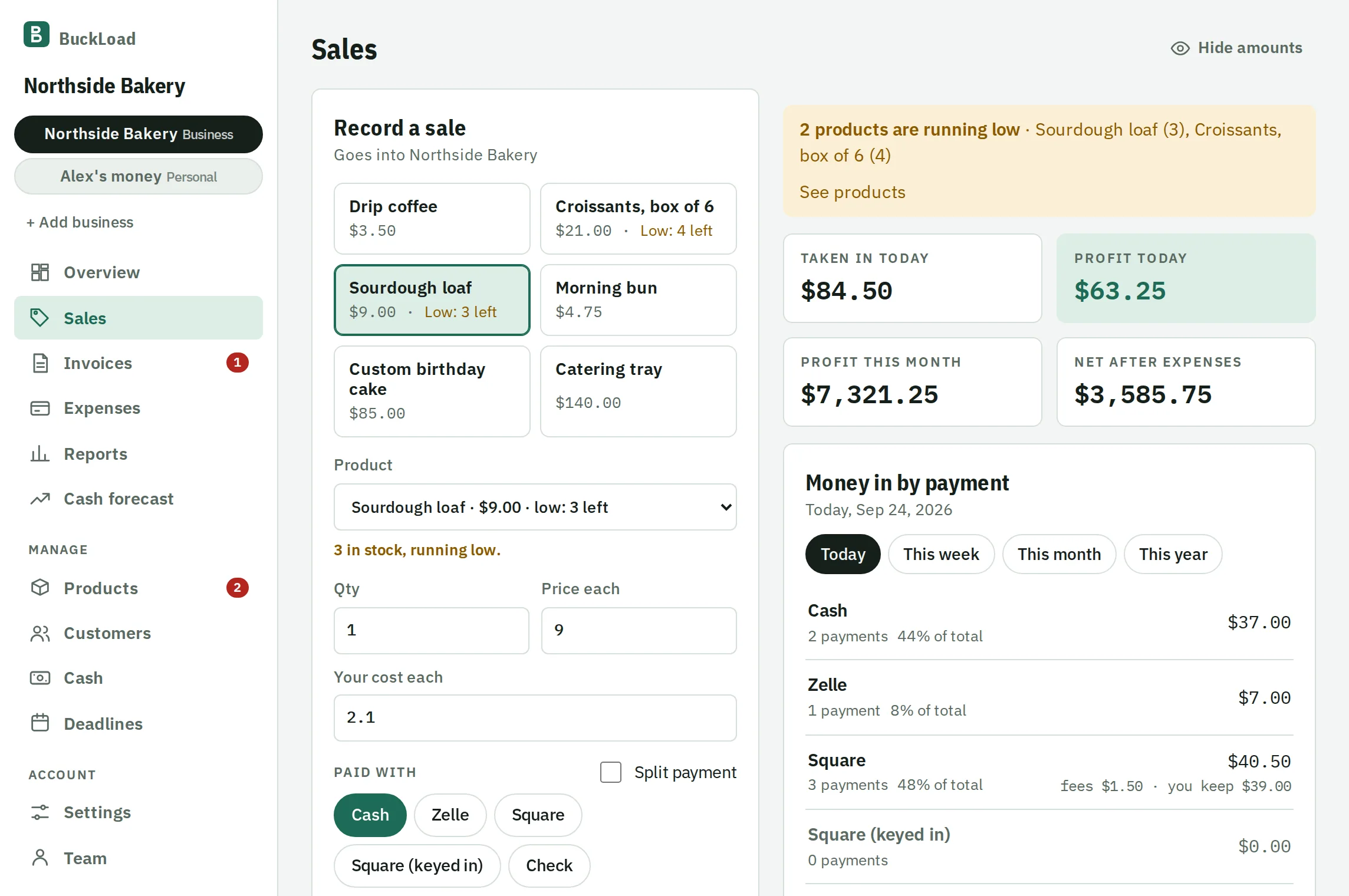
Invoices that follow up for you
Send an invoice or an estimate as a link or a PDF. Your customer opens it on any phone, no account needed.
- Know when it's opened
- See the first time and the last time your customer looked at it.
- Reminders when it's late
- Turn them on once and BuckLoad emails a polite reminder 1, 7, 14 and 30 days after the due date. Replies come to you.
- Repeat every month
- For regular customers, the next invoice is made, and sent if you want, on schedule.
- Signed and printed
- Ask for a signature on the link, or hand over your phone to sign in person. Print it from the same screen.
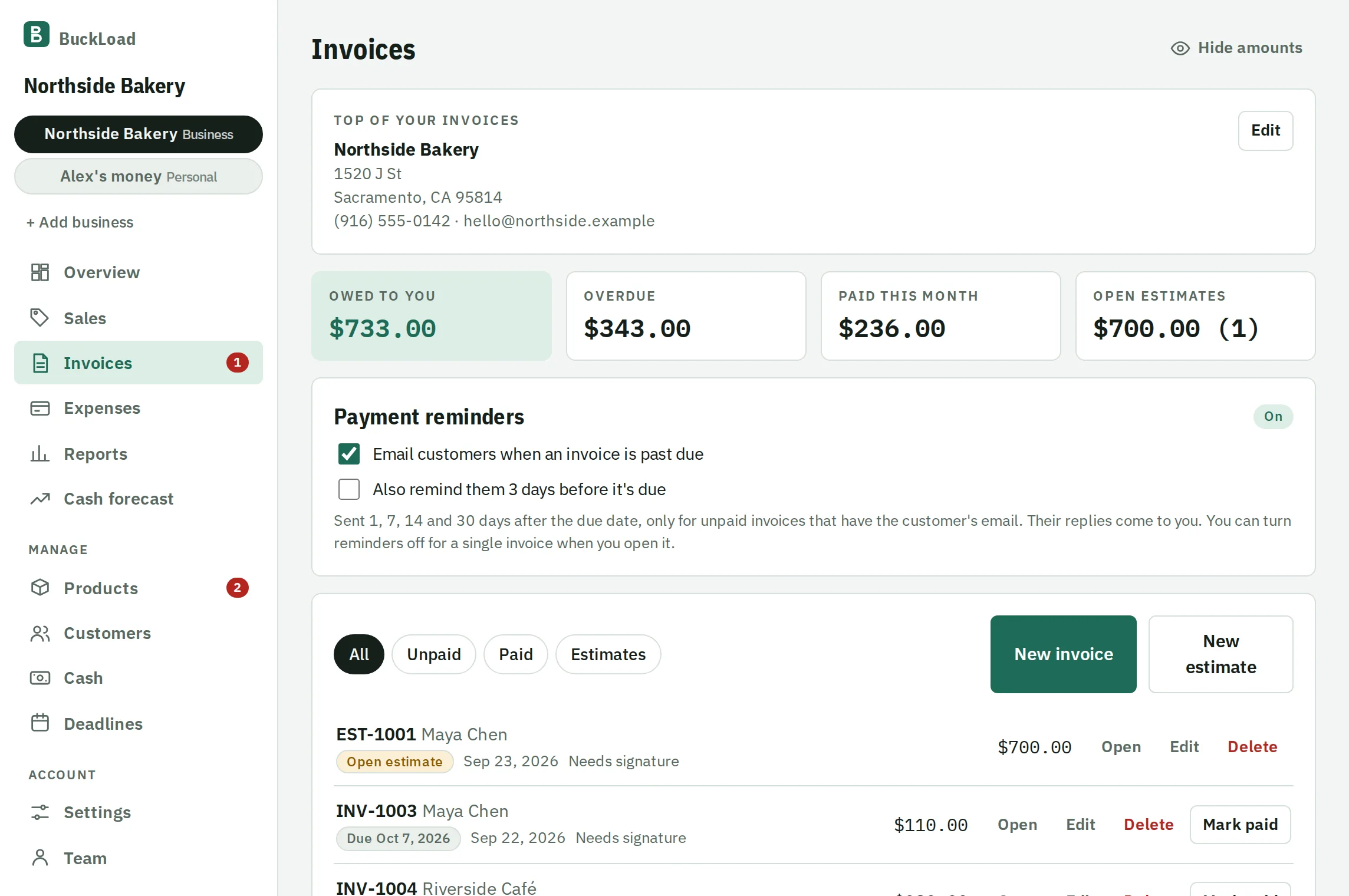
Ready when your tax preparer asks
A profit and loss for any month, quarter or year, with how much you were paid each way and what each product earned.
- Deadlines on a list
- Federal and state estimated tax dates and your sales tax returns, on your own state's calendar, each with the amount from your books. They show on your Overview two weeks ahead.
- Mileage and 1099s
- Log business miles at the IRS rate, and see which contractors you paid enough to need a 1099.
- Take it with you
- Download a PDF or a spreadsheet, or invite your accountant to read your books directly.
Bring your team and your accountant
Invite people by email. Each one sees only what their job needs, and you can change it any time in Team.
| Who | What they can do |
|---|---|
| You, the owner | Everything. Every number, every setting, and the only one who can delete. |
| Employees | Record sales, expenses and cash counts. You choose whether they can send invoices. They never see your profit or what things cost you. |
| Your accountant | Reads all your books and downloads reports. Can't change anything. |
Also included
- Receipts read for you
- Take a photo and the store, total and date fill themselves in. The photo is read on your phone.
- Bank statement import
- Bring in your bank's CSV, OFX or QFX file and check it against the statement balance. Rules sort it into categories and skip what's already there.
- Cash forecast
- See your bank balance for the next 30 to 90 days, with invoices coming in and bills going out, and a warning before a tight week.
- Balance sheet
- What the business has and owes today: cash, money customers owe, stock at cost, equipment and loans. Download it as a spreadsheet.
- Cash drawer count
- Count the drawer at closing and see if it's over or short against what was sold in cash.
- Customers
- Keep names and contact details, and see what each customer has paid and still owes.
- More than one business
- Separate books for each, with their own tax rates and fees, and reports combined when you want them.
- Works on any phone
- Add it to your home screen and it opens like an app. Nothing to install.
Questions from business owners
More answers on the Help page.
Is BuckLoad really free?
Yes. Every feature is free right now, with no card and no trial. If prices ever change, you'll get an email at least 30 days ahead, and you can download everything you've entered at any time.
Does it work with Square or Stripe?
Yes. Connect your Square account in Settings and every sale you ring up on your Square reader or app comes into BuckLoad by itself, with Square's real fee, the sales tax and any tip, so you don't type sales in twice. Connect Stripe and invoices paid online and sales charged with a QR code are recorded for you too. Anything else (cash, Zelle, checks) you record in a couple of taps, and BuckLoad takes out that method's fee.
Can it replace QuickBooks?
For many small businesses, yes: sales, profit, expenses, invoices, mileage and a profit and loss report. It doesn't do payroll or double-entry accounting. If your accountant needs those, invite them to read your books and download what they need.
Will it file my taxes?
No. It keeps track of the numbers and the due dates, and gives you a report to file with or to hand to your tax preparer.
Can my customers pay an invoice online?
Yes. Connect your own Stripe account under Settings > Online payments, and every invoice link gets a Pay button for card or bank transfer. The money goes to your Stripe account and BuckLoad takes no cut; you pay only Stripe's fee. When a customer pays, the invoice is marked paid and the sale is recorded with Stripe's real fee. You can also show a QR code so a customer in front of you pays on their phone.